



What does Google built-in add to the 2026 Acura MDX around Sioux City, IA?
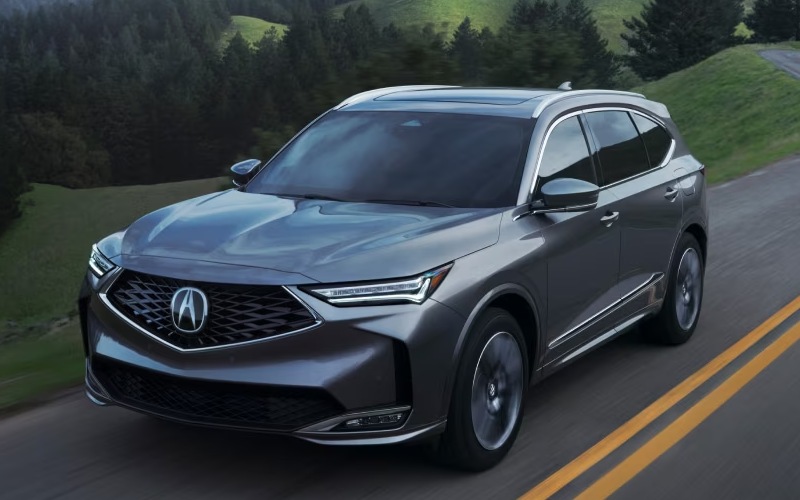
Vern Eide Acura – What does Google built-in add to the 2026 Acura MDX around Sioux City, IA?
Smart connectivity should simplify your day, not distract from it. In the 2026 Acura MDX, Google built-in is integrated so naturally that getting directions, queuing playlists, sending a quick message, or adjusting the climate becomes second nature—without digging through menus or picking up your phone. For families and commuters around Sioux City, IA, that kind of clarity is exactly what makes daily drives smoother and weekend trips less stressful.
Because Google built-in uses the services you already know—Google Assistant, Google Maps, and Google Play—you can ask for what you need with everyday language. The MDX responds quickly, presents information clearly on the 12.3-inch touchscreen and Precision Cockpit, and keeps you focused by minimizing taps and distractions. It is a thoughtful design choice that supports the way you really drive.
How Google built-in changes everyday driving
Voice commands become genuinely useful when your vehicle understands context and executes tasks cleanly. Say “Hey Google, find the fastest route to downtown” or “Play my morning playlist,” and the MDX gets moving. You can also adjust the cabin temperature, call a contact, or find a nearby coffee stop—all with your eyes up and hands on the wheel. Google Maps brings reliable traffic data and lane guidance, which is especially helpful on I-29 merges or when crossing the Missouri River between errands.
And because the MDX pairs Google built-in with wireless Apple CarPlay and Android Auto, you have flexible options. Whether you prefer Google’s native apps or your phone’s ecosystem, the system adapts to you rather than the other way around.
Navigation that feels a step ahead
With Google Maps integrated into the MDX, turn-by-turn guidance is fast, familiar, and easy to read. Search by voice, explore alternate routes, and preview complex interchanges before you arrive. If your day includes school pickup, a grocery run, and a quick stop at the riverfront, you can add stops on the fly without slowing down. The MDX can surface key prompts in the Precision Cockpit right behind the steering wheel to keep the windshield view clean and your attention forward.
For travelers, saved places and preferences tied to your Google account follow you into the MDX. That continuity helps a busy schedule feel comfortable, even when plans change.
Streaming, updates, and staying connected
The MDX features Wi-Fi Hotspot Capability so passengers can stream HD video and music on longer drives without leaning on everyone’s mobile data. Over-the-air updates help keep systems current with minimal effort. If you prefer native apps, Google Play provides a curated path to entertainment and productivity you can trust. And when you want silence, the MDX’s quiet cabin and available Bang & Olufsen® Premium Sound System turn streaming into a rich, room-filling experience.
Because tech should serve you—not the other way around—the MDX makes setup intuitive. Pair your phone wirelessly, customize your home screens, and go. Once you learn a few voice prompts you like, you will find yourself pressing fewer buttons and enjoying the drive more.
Pro tips for local drivers
- Use natural prompts: Try “Hey Google, navigate to the Tyson Events Center” or “Find a coffee near me” for quick, hands-free results.
- Customize displays: Set the Precision Cockpit to show maps and AcuraWatch alerts so key info stays front and center.
- Blend ecosystems: Prefer your podcast app via CarPlay or Android Auto? Keep it—while using Google Maps for navigation.
- Plan multi-stop errands: Add school pickup, a grocery stop, and a quick park detour into one voice-guided route.
- Stream smarter: Let passengers use the hotspot while you cue playlists through Google Assistant for seamless sound.
These small habits help the MDX’s tech fade into the background so you can simply drive. And if you are new to voice control, it only takes a couple of trips to feel at home.
Frequently Asked Questions:
Do I need my phone connected to use Google Maps in the MDX?
No. With Google built in, Google Maps runs natively in the vehicle, so you can navigate even if you prefer to keep your phone tucked away. Wireless Apple CarPlay and Android Auto are available if you want to use your phone’s apps instead.
Can I control climate and audio with my voice?
Yes. Google Assistant can adjust cabin temperature, set fan speed, change audio sources, and play specific songs, artists, or playlists. It is designed to reduce distraction and streamline routine tasks.
What about data usage for streaming?
Wi-Fi Hotspot Capability supports streaming and over-the-air updates. You can select a data plan from a provider like AT&T for hotspot use, while native apps via Google built-in manage their own connectivity for in-vehicle use.
How does the MDX keep information easy to see?
In addition to the 12.3-inch touchscreen, the 12.3-inch Precision Cockpit can show navigation and driver-assist alerts directly in your line of sight. That way, you spend less time glancing away and more time focused on the road.
For shoppers who want advanced tech that actually simplifies life, the MDX’s combination of Google built-in, wireless phone integration, and clear, customizable displays is a standout. Visit us to try a few voice prompts, set up your apps, and see how quickly the system adapts to your routine.
If you are ready to take the next step, Vern Eide Acura can help you compare packages and set up a focused test drive so you can experience Google built-in where it matters most—on your daily roads. We are proudly serving Sioux City, Fargo, and Mankato with knowledgeable guidance and a straightforward, supportive experience from start to finish.

0 comment(s) so far on What does Google built-in add to the 2026 Acura MDX around Sioux City, IA?