



How the 2026 Acura RDX True Touchpad Interface™ keeps Brookings, SD drives simple
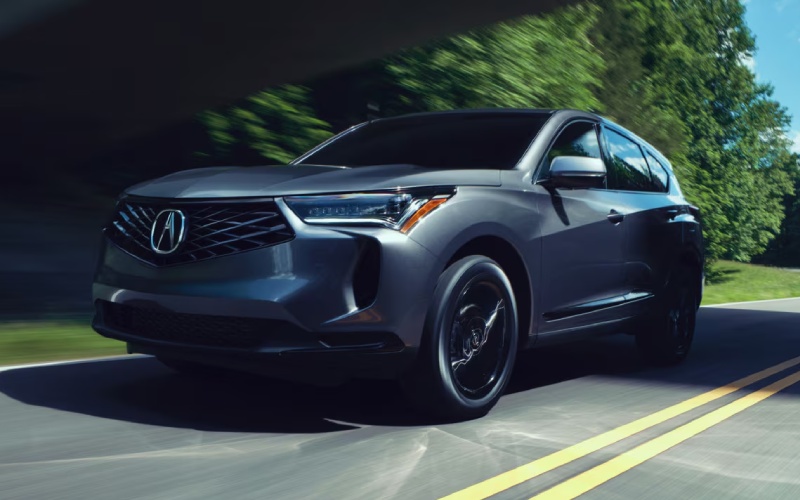
Vern Eide Acura – How the 2026 Acura RDX True Touchpad Interface™ keeps Brookings, SD drives simple
The 2026 Acura RDX has a lot going for it—eager turbo power, available SH-AWD® confidence, and a quiet, premium cabin. But day to day, the piece of tech many owners appreciate most is the True Touchpad Interface™. It looks different from a traditional touchscreen, and that’s the point: it’s designed to reduce distraction by aligning the touchpad precisely to the on-screen menu layout. Every spot on the pad corresponds to that exact spot on the display, so your hand learns where your favorite functions live. For Brookings, SD drivers who split time between campus, Medary Avenue, and weekend getaways along US-14, that kind of intuitive control makes every trip feel smoother.
Instead of reaching forward to poke a vertical touchscreen, you rest your wrist comfortably and use natural finger movements to select navigation, music, or settings. It’s precise, it’s predictable, and with wireless Apple CarPlay® and Android Auto™ standard, your go-to apps are just a tap away on the 10.2-inch HD screen. The result is a cockpit that feels organized—especially paired with the redesigned center console and available wireless charging that keeps cables from tangling up your day.
Why Acura engineered absolute positioning
Acura’s approach trades cursor-based swiping for absolute positioning. That means when your finger taps the upper-right corner of the touchpad, the upper-right tile on the screen responds—no dragging, no drifting. In practice, it shortens the time your eyes are off the road because your brain builds a “map” of the interface. Drivers tell us that within a week or two, they’re selecting functions on muscle memory alone. On a busy morning through downtown Brookings, that speed and certainty count.
Pair this with a clear menu hierarchy, and you get a system that favors quick decisions. Core functions are no more than a couple of taps away, and haptic feedback helps confirm selections. The interface is also tuned for real-world vibration, so it stays responsive on rougher county roads without accidental inputs.
Making your smartphone feel native
Because wireless Apple CarPlay® and Android Auto™ are standard across the lineup, your phone integrates seamlessly. Widescreen CarPlay makes excellent use of the RDX’s display real estate, showing maps and media at once when supported. Google Assistant through Android Auto responds quickly for hands-free requests—send a message, find a coffee spot near 6th Street, or queue up a podcast without hunting for icons. It’s a clean, consistent experience that transforms the cabin into a smart hub you don’t have to think much about.
The RDX also supports over-the-air updates for connected features, so refinements can roll in without a trip to the service drive. Combined with AcuraLink® Connected Services, remote functions like Remote Start, Vehicle Finder, and Automatic Collision Notification add another layer of everyday convenience.
Dialing in your audio with ELS STUDIO 3D®
Tech feels even more rewarding when it sounds amazing. The available ELS STUDIO 3D® Premium Audio System—engineered by Grammy-winning producer Elliot Scheiner—builds a vivid soundstage with 16 speakers, including four in the headliner. It brings separation and clarity that commuters notice right away, from bass detail to crisp vocals. If your Brookings routine includes weekly trips to Sioux Falls or family missions up to Watertown, it’s the kind of upgrade you’ll appreciate every mile.
What stands out is how the system handles varied sources. Streaming, satellite, or lossless files—ELS STUDIO 3D® reveals more texture and space. It pairs perfectly with the True Touchpad Interface™, letting you switch playlists or inputs quickly without breaking stride.
Tips for first-time users of the True Touchpad Interface™
- Start with the home screen: Spend a minute touching each corner of the pad to match tiles on the display—your brain will map positions fast.
- Customize favorites: Move your most-used functions to predictable spots so one tap gets you there every time.
- Use voice when it helps: Apple’s Siri or Google Assistant can handle quick tasks—directions, calls, messages—when your hands are full.
- Try both hands: Some drivers prefer the index finger; others like a thumb pivot. Choose what feels most natural with the wrist rest.
- Keep it clean: A quick wipe now and then preserves smooth operation and precise detection.
Beyond the interface, the RDX’s cabin design supports all-day comfort. A standard Panoramic Moonroof brightens the interior without adding noise, and available Milano leather or Ultrasuede™ elevates the look and feel. Iconic Drive™ ambient lighting brings personality with themes inspired by famous roads and circuits. It’s sporty, upscale, and quiet—an environment that makes time behind the wheel better, whether you’re carpooling to a Bobcats game or heading out of town.
On the road, the 272-HP VTEC® Turbo and 10-speed automatic deliver smooth, responsive power. Available SH-AWD® enhances stability and cornering poise in variable conditions, and the Integrated Dynamics System lets you switch between Comfort, Normal, Snow, and Sport. The RDX feels planted yet agile—easy to thread through town and confident on open stretches. With up to 79.8 cu.ft. of cargo space when you need it and thoughtful underfloor storage, it supports everything from grocery runs to weekend projects.
Safety-wise, AcuraWatch™ is standard and comprehensive. Features like Collision Mitigation Braking System™ (CMBS™), Road Departure Mitigation, Adaptive Cruise Control with Low-Speed Follow, and Lane Keeping Assist System provide reassurance without intruding on the drive. Available Low Speed Braking Control and the Surround-View Camera add everyday confidence in parking lots and tight alleys off Main Avenue.
If you’re curious how the True Touchpad Interface™ feels in your hands, the best test is seat time. You’ll know within minutes whether it clicks for you—and most drivers find it becomes second nature faster than expected. It’s one of those rare features that both simplifies and elevates the drive.
You can explore the system up close at Vern Eide Acura, serving Rapid City, Aberdeen, and Brookings, where product specialists can walk you through setup, pairing, and customization. Bring your phone, your playlists, and a couple of destinations in mind. A quick demo often turns into a longer drive—because once the interface and the rest of the RDX come together, everything about everyday driving just feels easier.

0 comment(s) so far on How the 2026 Acura RDX True Touchpad Interface™ keeps Brookings, SD drives simple