



How does Google built-in make everyday driving easier in the 2026 Acura MDX around Mankato, MN?
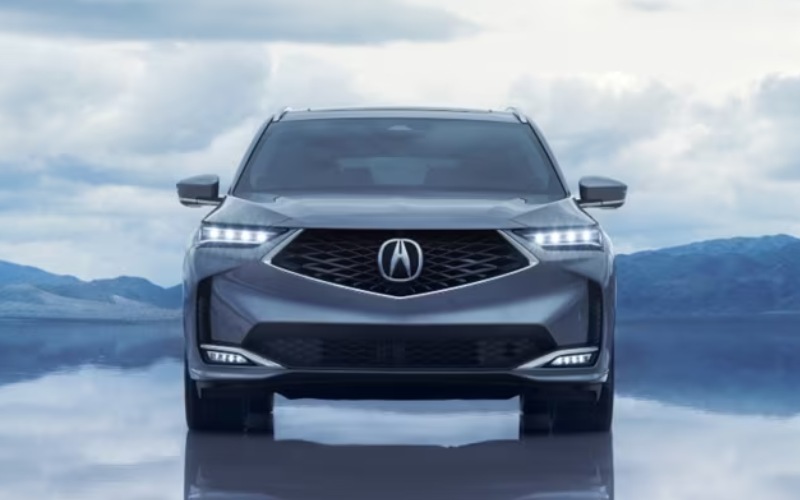
Vern Eide Acura – How does Google built-in make everyday driving easier in the 2026 Acura MDX around Mankato, MN?
Effortless is the point of luxury, and in the 2026 Acura MDX, Google built-in brings that idea to life every time you start the engine. If your daily routine takes you around Mankato, MN and into nearby towns, Google Assistant, Google Maps, and Google Play come standard so your navigation, voice control, and media feel as familiar as your smartphone—without the distractions that come with it.
This integrated approach is more than an app mirror. Because the system is built into the MDX, responses are quick, the interface is clean on the 12.3-inch touchscreen, and voice commands respond naturally when you say “Hey Google.” From setting a course to picking the right playlist, it reduces touches and distractions in moments that matter—like a last-second lane change prompt or a call you need to make hands-free.
What you can do with a simple “Hey Google”
With Google built-in, your voice is a powerful, safe way to handle the essentials while keeping your focus on the road. Here are everyday tasks it simplifies:
- Set navigation: “Hey Google, navigate to River Hills Mall” or “Hey Google, find coffee on my route.”
- Control climate: “Hey Google, set the temperature to 70 degrees.”
- Make calls: “Hey Google, call Alex at work.”
- Manage media: “Hey Google, play the latest episode of my podcast.”
- Check info: “Hey Google, what’s traffic like on Highway 22?”
Because the MDX includes a configurable 12.3-inch Precision Cockpit™, you can keep turn-by-turn prompts and key alerts in your line of sight, then complement that view with the available Head-Up Display for speed, next-turn cues, and AcuraWatch™ notifications projected on the windshield. The result is a cabin that feels coordinated rather than cluttered.
Navigation that learns your routine
Google Maps shines in the real world because it understands it. In the MDX, Maps displays beautifully across the wide screen and can factor in real-time traffic, construction, and closures around Mankato. Searching by voice is fast and forgiving—even if you mangle the name of a business. Routing updates happen quietly in the background to help you stay ahead of slowdowns without extra taps. And when you need to park, it’s easy to find nearby lots, check hours, and get walking directions on your phone once you’re parked.
Media, calls, and calendars—without the juggling act
Google Play offers popular streaming options and curated suggestions based on your listening habits. If you prefer your phone-centric ecosystem, the MDX still supports wireless Apple CarPlay® and Android Auto™ for maximum flexibility. Calls and messages are handled cleanly with natural voice prompts, so you can stay connected on the go without diving through menus. It’s one of the biggest differences you’ll feel switching from a system that mirrors your phone to one that’s tightly integrated into the vehicle—with fewer taps, less friction, and a more consistent experience.
Comfort and convenience touches you’ll notice
One of the understated perks of Google built-in is how well it supports the rest of the MDX technology. The wireless charging pad keeps your device topped off, Wi-Fi Hotspot capability helps passengers stream, and the available Bang & Olufsen® system turns spoken word and playlists into rich, room-filling audio. When paired with the Integrated Dynamics System, you can cue up the right soundtrack and drive mode for the moment, from Comfort to Sport, with a quick toggle and a quick “Hey Google” request.
Safety-forward by design
Google built-in complements AcuraWatch™, the standard suite of safety and driver-assistive technologies that includes features like Collision Mitigation Braking System™ (CMBS™), Lane Keeping Assist System (LKAS), Adaptive Cruise Control with Low-Speed Follow, and Traffic Jam Assist. Voice-driven navigation and controls mean fewer distractions—and when you add available tools like the Surround-View Camera or Low Speed Braking Control, the MDX supports awareness from every angle as you maneuver into tight spots or inch through crowded lots around campus and local venues.
Who benefits most from Google built-in?
If you split time between school pickups, downtown errands, and highway drives out toward nearby communities, you’ll appreciate how quickly the system handles the little things. Drivers who frequently explore new locations, rely on up-to-the-minute routing, and prefer voice-first control will feel an instant upgrade from older infotainment approaches. And if you’re an audio enthusiast, the combination of Google Play and the Bang & Olufsen® system is a treat—especially on longer stretches where clarity and staging keep everyone happy.
How to get a real feel for it on a test drive
Bring a few destinations in mind, and your favorite playlist queued up. Ask your specialist to walk you through common voice commands, then try them while you’re moving—set a route, adjust climate, place a call, and swap playlists. Glance at the Precision Cockpit™ to see how information lays out cleanly, then toggle the Head-Up Display if equipped to experience it projected in your sightline. This quick routine shows how the system saves time and reduces cognitive load in daily use.
Final thought: simplicity that scales with your day
Luxury is as much about reducing friction as adding features. In the 2026 Acura MDX, Google built-in removes the tedium from everyday driving and gives you tools that feel intuitive from day one. It’s a smarter, calmer way to get where you’re going—especially when paired with the MDX’s refined ride, SH-AWD® confidence, and three-row comfort.
If you’re ready to try it for yourself, Vern Eide Acura is serving Fargo, Mankato, and Marshall with tailored test routes and side-by-side package comparisons so you can see how Google built-in fits your life. Bring your real-world to-do list—we’ll help you check it off from the driver’s seat.
Frequently Asked Questions:
Do I need my phone to use Google Maps in the MDX?
No. With Google built-in, Google Maps runs natively on the vehicle’s 12.3-inch touchscreen. You can navigate, search, and get voice-guided directions without connecting your phone, and you can still use wireless Apple CarPlay® or Android Auto™ if you prefer.
Can I control climate and audio by voice?
Yes. Say “Hey Google” and ask to set the temperature, adjust fan speed, change sources, skip tracks, or find a specific podcast. It’s quick, natural, and helps you keep your hands on the wheel.
How does Google built-in interact with the Head-Up Display?
The available Head-Up Display can show navigation prompts and select alerts from AcuraWatch™ so critical information stays in your forward view. It works alongside the 12.3-inch Precision Cockpit™ and main touchscreen for a coordinated, glanceable setup.
What if I’m used to my phone’s apps?
You’re covered either way. Google built-in is seamless, but the MDX also supports wireless Apple CarPlay® and Android Auto™. You can choose the interface you like best and even switch between them depending on what you’re doing.

0 comment(s) so far on How does Google built-in make everyday driving easier in the 2026 Acura MDX around Mankato, MN?